Weekend Update iPhone – Hulu.com • 12.07.07
A Funny Clip From Hulu.com. Weekend Update iPhone Special… It’s hilarious! haha!
Hulu is pretty cool! I love it…
A Funny Clip From Hulu.com. Weekend Update iPhone Special… It’s hilarious! haha!
Hulu is pretty cool! I love it…

After updated my mac to the latest version of mac leopard my php installation broke, I guess because Leopard installed Apache2 and I was using Apache1.3 which was what OSX 10.4 came with. So to get PHP5 working with Mac OS X 10.5 Leopard. Do the following:
1. Launch the Terminal its located in applications/utilities
2. In Terminal type: cd /private/etc/apache2
3. Once your in the directory “/private/etc/apache2″, using what ever text editor you like open the file named httpd.conf (if your using textmate text editor, you can do, mate ./httpd.conf)
4. Once you open the httpd.conf file now look for the following line:
“#LoadModule php5_module libexec/apache2/libphp5.so” Once you find it, it’s somewhere around line number 114, uncomment the line So it should look something like this:
LoadModule php5_module libexec/apache2/libphp5.so
5. After doing all that now back in terminal type this command: cd /private/etc/apache2/users
6. Once in that directory open the file with your account username (ex. my file would be named, FernyB.conf)
7. Delete all contents inside the file
8. Start the web server or restart it by going into System Preferences > Web Sharing
9. In Terminal type: open /Library/WebServer/Documents (that should open up finder in that location)
10. Now Create a file called phpinfo.php and place it in /Library/WebServer/Documents
11. Open up phpinfo.php and type the following into phpinfo.php

12. Save and close phpinfo.php13. Now with your favorite web browser safari go to http://127.0.0.1/phpinfo.php
14. Now you should see the PHP Information page
15. The php.ini file will be located in /etc
16. In the directory /etc you will need to rename or copy and rename the file php.ini.default
17. In the directory /etc should have a file named php.ini
18. Now restart the web server, System Preferences > Web Sharing
19. That’s all.
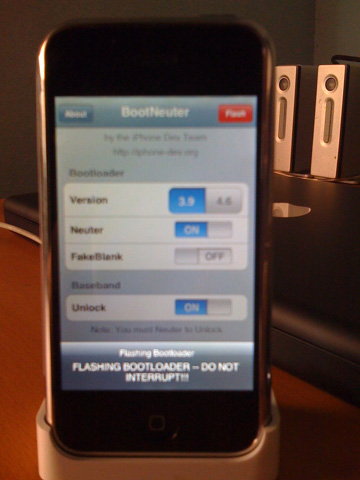
My copy of Mac OS X Leopard, has shipped, it’s almost home!

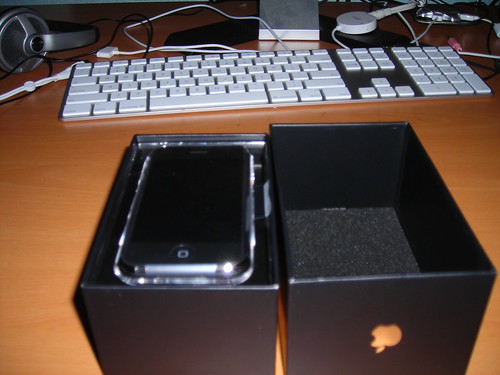
Finally. I have an Apple iPhone. Now I am can be cool too! jk.. but seriously I have an iPhone.
I got the 8GB model. Oh yeah & on a sidenote I also got the new Apple Keyboard it kick ass!
Check out my flickr photos
So today I used the ln utility or link utility, so here is how you make a symbolic link, trust me they are very useful especially when you have external Hard Drives.
Open the Terminal. Type, cd ~/ that will put you in your home directory.
Okay now. look for your target, in my case I was practicing some Ruby On Rails stuff because I am a noob at it. Not stupid just new with it and I don’t always have time, anyways the case is that I keep all my RoR files in my external hard drives which has the path /Volumes/Mac\ HD/FernyB/~ror
I get tired or typing that everytime so I finally created a symbolic link in my home directory. So now I type
cd ~/~ror and that will drop me into the directory where I keep my RoR files which again is /Volumes/Mac\ HD/FernyB/~ror
To create the symbolic link type ln -fs /Volumes/Mac\ HD/FernyB/~ror ~/~ror
So now when I am in my home directory all I type is cd ~/~ror and this will put me into the /Volumes/Mac\ HD/FernyB/~ror directory. So if I type pwd the path will show as /Users/FernyB/~ror.
See that is why symbolic links are cool….
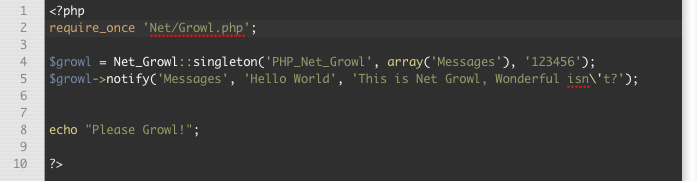
So today I was messing around with php & growl. So here is tip for getting started. First download growl if you dont have it already. Next install the php pear package

Once you have all the set-up. Go into your System Preferences and go into the Network tab in the growl settings. While in the Network tab make sure you click on “Listen for incoming notifications” & “Allow remote application registration” and set the password. I set my password to “123456″

Now type this piece of code.

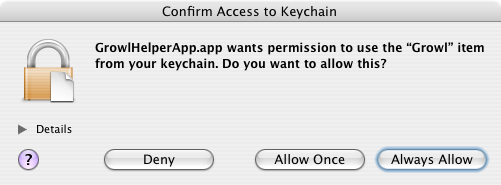
The first time you run the file through your web browser OSX will prompt you with a message.
Just Click Always Allow unless you have a reason not to.

So once you have done everything from above you should now see a message like the one below.

Wasn’t that cool! so here are the all my files I used.
Download: php-growl.zip
Sun, Feb 11, 2007 – Update: GAMV-PHP works now. GAMV Application still does not work but I really don’t have time to fix it, I’m busy working on other projects. If you want to you can fix it. Here is the source code. gamv source code its made in RealBasic.
Update: A fix for this will be available tomorrow.
GAMV (Get AOL Music Videos) is an app to get and watch aol videos. simple as that.
Mac: GAMV.zip | Windows: GAMV.exe.zip | Linux: GAMVx.zip
So I was over at music.yahoo.com and I was browsing the site so I search for Acceptance, a band I like, and I clicked on the video to try and watch it to see what would happen. I was surprise to find out that now mac users can watch music videos over at yahoo. Since they show them to you “Youtube Style” in other words in flash video. I then checked the uk.launch.yahoo.com & ca.music.yahoo.com and it seems yahoo has not yet change things on those sites. So if yahoo changes to all flash video does that mean phpLYFOX & LyFOX are doomed? Now maybe there is a way to download those flash videos from yahoo and transcode them into .mp4.
phpLYFOX is completed. What is phpLYFOX? It is simply a way to watch yahoo music videos for us Mac users since Yahoo absolutely doesn’t care to provide Macintosh users access in other words its web based. So here you go my mac friends. Try it out phpLYFOX or you can download the source code here phpLYFOX.zip
LyFOX Dashboard Widget for use mac people.
Download: lyfox.widget.php
LyFOX means Launch.Yahoo For OSX. It was intended for mac users to be able to watch music videos from Yahoo.
Its available for Mac, Windows, & Linux
Mac: LyFOX.zip | Windows: LyFOX.exe.zip | Linux: LyFOX For Linux
GAMV-PHP is GAMV which is an accronym for Get AOL Music Videos. Original it was only for mac but since people started to complain I figured, shit okay I’ll compile the windows and linux version and post them for download. Enjoy! GAMV-PHP or download it GAMV-PHP.zip
|
|
|
Recent Listened to TracksLoading... |
Bad Behavior has blocked 153 access attempts in the last 7 days.